Lollipop: A Chic Script Font for Elegant Web Design
As a web designer, I’m always on the lookout for fonts that can add a touch of elegance and personality to my projects. Recently, I had the opportunity to test Lollipop, a chic upscale script font, in a real website layout. Let me share my experience with you.
First Impressions: Visual Charm and Personality
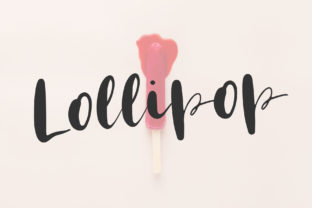
The moment I saw Lollipop, I was struck by its romantic and sophisticated style. Every single letter has been meticulously crafted, making it a perfect choice for projects that require a touch of class. The flowing, cursive-like strokes give it a hand-drawn feel, which is both inviting and visually appealing. This font has a natural, almost whimsical charm that can instantly elevate the look of any digital design.
Testing Lollipop in a Real Website Layout
I decided to test Lollipop in a hero section of a boutique online store. The goal was to see how it would perform in a high-impact area where first impressions are crucial. I used it for the main heading, "Welcome to Our Boutique," and paired it with a clean sans serif font for the body text. The result was stunning. The Lollipop font added a touch of luxury and romance, making the page feel more welcoming and personal.
Hero Titles and Section Headings
Lollipop is particularly well-suited for hero titles and section headings. Its decorative nature makes it stand out, drawing the user’s attention and creating a strong visual hierarchy. For example, in a coaching website, using Lollipop for the main headline, "Transform Your Life with Personal Coaching," can make a powerful statement and set the tone for the rest of the site.
Responsive Design and Readability
One of the key aspects of web design is ensuring that the font is readable across different devices and screen sizes. I tested Lollipop on both desktop and mobile screens, and it performed admirably. On larger screens, the font’s elegant curves and flourishes were beautifully displayed, while on smaller screens, it maintained its readability without losing its charm. However, for very small buttons or navigation text, I recommend using a simpler, more legible font to ensure a smooth user experience.
Font Pairing and Brand Consistency
To create a balanced and cohesive design, I paired Lollipop with a clean sans serif font like Montserrat. This combination works well because the sans serif provides a modern, professional feel, while Lollipop adds a touch of creativity and personality. This pairing is especially effective for landing pages, where the header needs to be eye-catching, and the body text needs to be clear and easy to read.
Using Lollipop in Different Web Elements
Beyond hero sections and headings, Lollipop can be used creatively in various web elements. For instance, in a product landing page, you can use it for the call-to-action (CTA) button, such as "Shop Now" or "Learn More." The decorative nature of the font can make these CTAs more engaging and memorable. Additionally, Lollipop can be used for short phrases, logo text, or decorative accents in blog graphics and digital ads.
Limitations and Best Practices
While Lollipop is a versatile and beautiful font, it’s important to use it judiciously. It may not be the best choice for long body copy, small navigation text, or dense dashboard layouts. These areas require a more legible and straightforward font to ensure accessibility and ease of use. For these cases, consider using a simple sans serif or a clean serif font.
Before using Lollipop in your web projects, make sure to check the included styles, alternates, ligatures, and swashes. Also, verify the availability of webfont formats and multilingual support if needed. Finally, ensure that you have the appropriate commercial font licensing, especially if you plan to use it on client projects, online stores, or digital templates.
Final Thoughts
Lollipop is a fantastic addition to any web designer’s toolkit. Its romantic and upscale style can bring a unique and elegant touch to a wide range of digital projects. Whether you’re designing a creative portfolio, a boutique online store, or a coaching website, Lollipop can help you create a memorable and visually appealing experience. Just remember to balance it with more legible fonts for optimal readability and usability.
Give Lollipop a try in your next web project and see how it can transform your design into something truly special.